TL;DR
- Buy Me a Coffee is a popular creator monetization platform allowing fans to support their favorite creators through one-time tipping, memberships or even product purchases.
- Essential platform features include subscription management, one-time tipping, content management, product shop, creator dashboards, payment workflows, along with business analytics.
- The development process starts with choosing the right foundational platform, setting up domain and hosting server, picking up revenue model, feature selection, customization, testing the features, launching, and marketing your site.
- The cost of building a website like Buy Me a Coffee is approximately $30,000 to $1,00,000+ and takes 4 to12 months of development.
- Creator marketplace clone scripts by Fanso.io help entrepreneurs to launch at a significantly lower cost within 1-2 weeks.
The creator economy is a different landscape today, as creators are no longer limited to advertising revenue or brand sponsorships. And the emerging fan-creator support models have opened multiple avenues for creators to monetize their work.
Now, they can ask fans to directly support and fund their work with donations, memberships, and crowdfunding. Platforms like Buy Me a Coffee solve a real world problem of financial support for creators with one-time “buy a coffee” payments.
If you’re reading this blog, you might be an entrepreneur planning to build a similar creator monetization platform. So, let’s start this guide on “how to build a website like Buy Me a Coffee” and learn some valuable business lessons!
How to Build a Website Like Buy Me a Coffee?
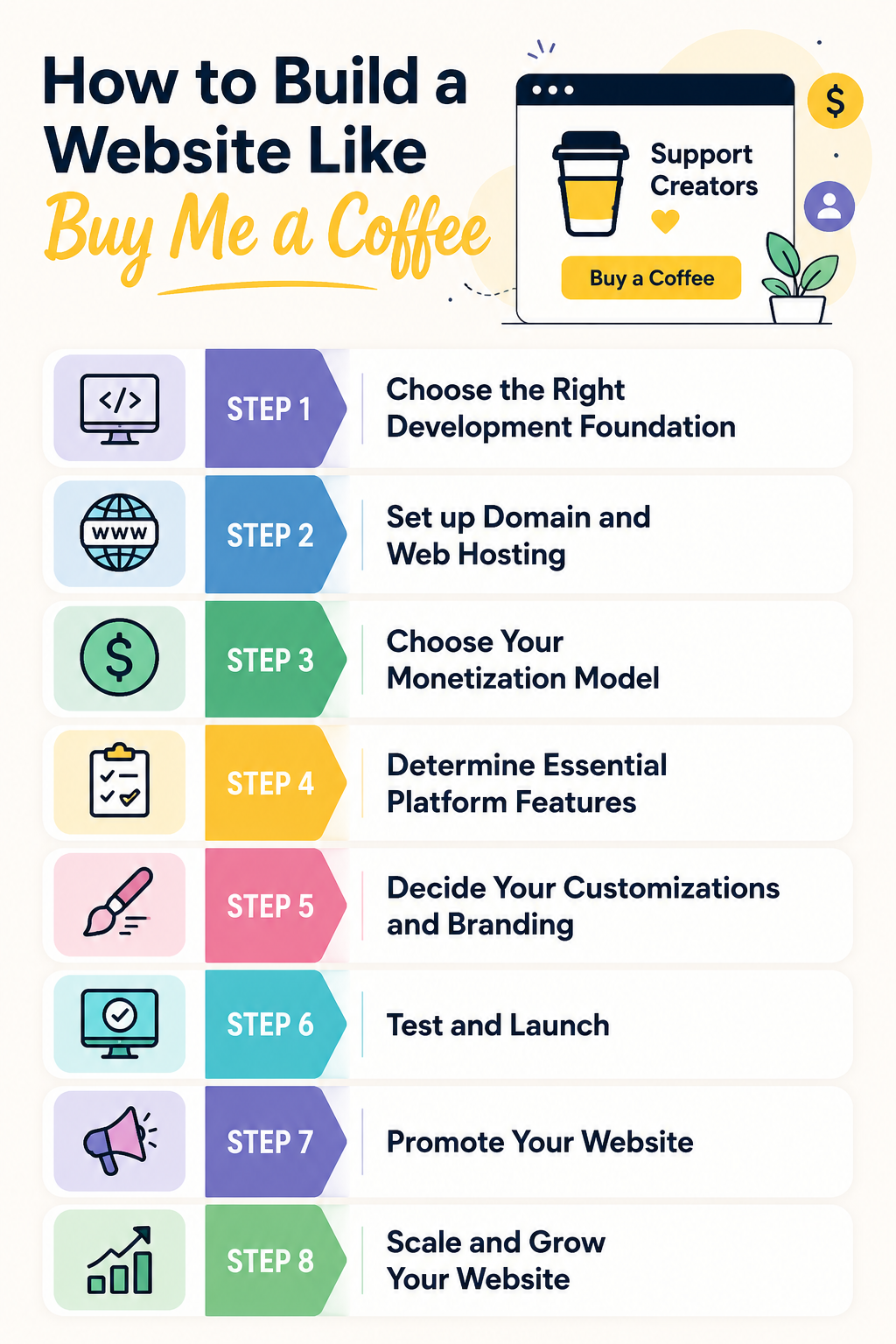
Here’s a step-by-step guide to get you started with the development process:
Step 1: Choose the Right Development Foundation
The foundation of your creator marketplace is essentially the development approach you choose.
Startups can cut down 40%-60% of MVP costs and deliver 50%-70% faster with no-code or low code approaches. And for most startups and businesses, clone scripts offer a ready foundation to scale your platform on.
Why Ready-Made Creator Marketplace Clone Scripts Work?
- Speed Advantage: You can launch faster since all the core features are pre-built. This helps to focus on marketing, growth, and customer acquisition skipping the long development cycles.
- No Coding Skills: Simple to manage and launch without coding knowledge or technical expertise. You can refer to knowledge base, walkthroughs and also get hands-on onboarding and installation help from the support team.
- Cost-Effective: Launch a self-hosted creator marketplace with lower upfront investment and no recurring charges.
- Highly-Customizable: Ready-made creator marketplace clone scripts allows you to customize your website based on your platform goals and branding needs. Add local payment gateways, make UX tweaks and new revenue streams, all with premium add-ons.
- Proven Business Model: Built on a tried-and-tested model adopted by successful marketplaces, reducing the trial-and-error failure risks.
Step 2: Set up Domain and Web Hosting
Next, you’ll need a domain and hosting server to set up your website running.
Domain Name
Your domain name is your website’s address, so people can find your website on the internet. Ensure your domain name is short, easy-to-remember, and related to your niche.
Popular Domain Providers: GoDaddy, Hostinger, and NameCheap
Hosting Server
The web hosting server is a dedicated space where all your website files, code and databases are stored.
Types of Web Hosting:
- Managed Hosting: The hosting provider handles the technical side for you, while you rent the hardware space. It manages updates, security, backups and monitoring.
- Unmanaged Hosting: This type of hosting offers more control and flexibility, where the provider just manages the physical server and uptime, while the technical aspects are handled by the client.
Recommended Hosting Providers: Digital Ocean / Linode / AWS EC2/ Hostinger
Hosting Requirements:
- CPU: 4 vCPUs (recommended)
- RAM: 8GB (recommended)
- Storage: 100GB SSD
- OS: Ubuntu 22.04 LTS
- Network: 1Gbps connection
Step 3: Choose Your Monetization Model
Once you have set up your platform’s technical infrastructure, it’s time to see how your platform drives revenue.
Buy Me a Coffee enables creators to earn from one-time tips, memberships, product sales, while charging a 5% platform fee on these transactions.
Revenue Model for Buy Me a Coffee-Style Platforms:
-
Platform Fees (Primary Revenue Stream)
Earn a fixed percentage of platform fees from platform transactions.
For example, if the creator earns $50, a 5% sales cut would leave creators with $47.5 earnings.
Why does this work?: Scales with revenue, creators don’t pay until they earn, simple and transparent revenue model.
-
Membership Tiers
Monetize from recurring membership fees with unique creator-based tiers. In turn, fans get exclusive access, perks, and community access. Creators can set up different tiers and unique benefits like premium content, niche-related tips or plans, and discord access.
Why does this work? Recurring revenue, builds loyal fanbase, audience segmentation and upselling opportunities.
-
Tipping
One-time virtual tips allows the audience, fans or supporters to show their support and appreciation and fund creator projects. Enable fans to send tips during live sessions, on profile bios, newsletters. You can even offer set amounts for tips like $3, $5, $10, $50, providing more tipping options.
Why does this work?: Low friction, no-long term commitment, high transaction volume, complements other monetization models.
-
Product Sales
Creators can sell physical goods, digital products like e-books, courses, templates, audio clips, and even services through built-in merch stores. This helps to turn fandom into income and expand the user base.
Why does this work?: Expands creator income, niche product upselling, and brand building
-
Advertising & Sponsorships (Additional)
Earn by displaying brand-related ads on your website and side panels. You can partner with popular ad networks like Google AdSense, Media.net, Ezoic, Adsterra, etc. This works for platforms with high traffic, however make sure the ads aren’t intrusive.
Sponsorships include shoutouts in newsletters, video promotions or promoting attractive brand deals. Here businesses are willing to pay for capturing user’s attention.
Why does this work?: Passive income, no direct cost to users, easy to implement
Step 4: Determine Essential Platform Features
Creator economy is a crowded marketplace, hence it’s important to choose your platform features carefully.
Creator-Level Features
- Subscription Management: Allow creators to set up membership tiers with unique rewards, perks and access level, along with pricing control.
- Monetization Options: Offer diverse revenue streams such as one-time tipping, product shop, and paywalled content, to boost creator earnings.
- Content Management: Support multiple content formats (posts, audio, video, courses, coaching) and provide creation and publishing tools.
- Creator Dashboard: Enable creators to track conversion rates, engagement, earnings breakdown using analytics & reporting tools.
- Payout Management: Creators can request and get quick payouts through bank transfers or PayPal.
User-Level Features
- Search & Discovery: Users can explore creators across niches, content types, communities and based on their follower count.
- Wallets & Payment Integration: Digital wallets allow fans to make quick payments for tips, product purchases, etc.
- Communication Tools: Fans can interact with creators through comments, likes, and direct messages.
- Mobile-First Design: Responsive design and layouts ensure the platform is accessible from desktops, tablets, and smartphones.
- Community Features: These are dedicated networks for supporters, creators and patrons for open discussions, challenges and events.
- Email Notifications: Fans can receive newsletters, thank you emails, new post alerts from creators.
Admin-Level Features
- User & Creator Management: It enables admins to manage user accounts, supporters, onboarding, authentication and roles on creator platforms.
- Content Moderation: This includes managing account settings, privacy, moderation tools, and user reporting tools.
- Integration Capabilities: Allow different third-party tool integrations such as email marketing software, spreadsheets, communication tools to enhance platform workflows.
- Analytics & Reporting: Track overall platform revenue, set commissions, minimum and maximum subscription pricing and generate custom reports.
Step 5: Decide Your Customizations and Branding
Imagine launching your platform among a sea of similar creator platforms. If your platform just offers the core functionality and has nothing new to offer, how will it stand out? That’s where customization and branding come in!
Today, users are looking for hyper-personalized experiences, tailored to their interests and needs. Every part of your creator platform should reflect your niche, vision and brand goals.
Customize your Buy Me a Coffee website with:
- Advanced membership tiers with drip content, trials, and loyalty badges
- Unique brand colors, typography, banners, etc.
- Support different payment solutions and local payment methods
- AI customizations such as recommendations, smart pricing, AI moderation,etc.
- Niche-specific features such as fan clubs, code repositories, course delivery,etc.
Customize your Buy Me a Coffee Clone with Fanso’s premium add-ons: Add multi-language support, crowdfunding support, paid audio calling and region-specific payment gateway. You can even hire our development engineers to customize as per your business and branding needs.
Step 6: Test and Launch
Before your website goes live, it’s essential to check if everything is functioning as intended. Your website should be free from any last-minute glitches, manage user requests, and be secure enough.
Here’s a pre-launch checklist for your website:
- Functional & Security Testing: Check whether all the key workflows such as content management, payments, analytics and security controls are functional.
- Check Website Content: Re-check any grammatical mistakes, CTAs and buttons on the website.
- Backup Solution: Keep a website backup, in case you lose all the data during launch.
- Mobile-Compatibility: Make sure your website is mobile-friendly with responsive layouts, large buttons and easy navigation.
Once the website is good-to-go, publish it and announce the launch on email, social media, and strategic channels.
Step 7: Promote Your Website
Building and launching your website is just half-way through; the real test is to reach out to your audience. To attract early users and creators, you need to promote on strategic channels where your audience uses.
Effective promotional channels include:
- Email Marketing: Build email lists, share newsletters, top trends, and personalized promotional messages.
- Social Media Marketing: Promote platform features, member spotlights, success stories on TikTok, Facebook, and X (Twitter).
- Events: Host live events, challenges, contests to build brand credibility and authority.
- Referrals: Word-of-mouth marketing still holds its charm. Offer attractive incentives to creators and users for new sign ups increasing organic visibility.
- SEO: Target high-intent keywords and publish monetization guides, how-to-blogs and informational videos.
- Paid ads: Creators can run Google ads and YouTube promotional ads directed to their supporter pages. However, they need to adhere to Google’s strict ad policies.
Step 8: Scale and Grow Your Website
While you might have attracted an initial set of platform users, building a scalable business is essential for long-term sustainability.
Here are a few proven ways to scale your business:
- Automate creator verification & onboarding
- Diversify monetization streams with product bundles, ad revenue, affiliate marketing
- Scale technical infrastructure such as CDN, load balancing and databases
- Support multiple global and local payment gateways
- Expand the user base, introduce localization and multi-currency support.
Scaling your creator platform is all about building long-term relationships and overall revenue stability.
How Much Does it Cost to Build a Website Like Buy Me a Coffee?
The cost of building a Buy Me a Coffee-like platform is approximately $30,000 – $1,00,000+ when building from scratch. Using white-label clone scripts reduces MVP development cost and project timeline to 1-2 weeks.
Custom Development Based on Platform Components
| Platform Component | Estimated Cost |
| Hosting Costs | $42 – $150 /month |
| Domain Fees | $10 – $100/ year |
| Wildcard SSL certificate | $10 – $50/ year |
| Payment Gateway Fees | Depends on the payment gateway (No additional costs for integrating with platform) |
| Development Cost | $30,000 – $1,00,000+ |
| Testing & QA | $5,000 – $10,000 |
| Ongoing Maintenance | Includes hosting fees, video storage, maintenance costs, email marketing software, etc. |
Custom Development vs Clone Script Pricing
| Development Approach | Estimated Cost | Development Timeline |
| Custom Development (Building from scratch) | $30,000 – $1,00,000+ | 4 – 12 months |
| Buy Me a Coffee White Label Clone Script Cost | $700 – $1500 | 1-2 weeks |
Security and Compliance Considerations
Your platform’ data and user privacy is valuable; safeguarding it is crucial. The legal landscape for creator platforms is constantly evolving and staying updated avoids serious legal consequences.
Consider the following legal aspects:
- Age Verification: Creator platforms like Buy Me a Coffee only allows users over 18 years of age. Integrate KYC process and age verification tools like Jumio, SumSub, and Veriff while onboarding creators.
- Payment Processing Compliance: Integrate with PCI-DSS compliant payment gateways like Stripe, PayPal, and Authorize.net to handle transactions securely.
- Regulatory Compliance: The state and federal laws are unique to different countries and regions. For example, GDPR is for EU users, while CCPA (California Consumer Privacy Act) governs businesses in the U.S.
- Chargeback Management & Fraud Protection: Chargebacks are a real problem for creator platforms. Implement transparent terms and services, fraud detection tools, and privacy policies to reduce customer disputes.
Start Your Buy Me a Coffee Clone Today
Building a Buy Me a Coffee Clone helps you build a solid creator-support system, share your passion and grow a niche community.
Whether you’re an aspiring entrepreneur or established creator building your fan club, Fanso’s creator marketplace clone script provides a great foundational framework for your business. The best part is we offer 100% platform ownership and don’t take any commission cuts or recurring fees.
If you have a clear vision, and are tapping into a relevant market problem, you’re just one step away from your dream business. Get in touch with us to explore our creator marketplace script features and launch your Buy Me a Coffee Clone with confidence!
FAQs-Related to How to Build a Website Like Buy Me a Coffee
1. What is Buy Me a Coffee clone website?
Buy Me a Coffee clone is a creator monetization website where fans can support creators through one-time tips, memberships, merch sales and custom requests.
2. What makes a successful Buy Me a Coffee Like Website?
Easy onboarding, creator-friendly interface, membership system, secure payment integration and scalable infrastructure helps to build a successful creator platform.
3. Which is better for building a website like Buy Me a Coffee: ready-made clone scripts or custom development?
Ready-made clone scripts are cost-effective and come with a pre-built feature set to launch your platform within 1-2 weeks, rather than months.
4. How does Buy Me a Coffee make money?
Buy Me a Coffee makes money from platform fees, one-time donations, memberships, product sales, and commissions.
5. Which payment gateways are recommended for Buy Me a Coffee-like website?
Stripe, PayPal and Square are the standard payment gateways for Buy Me a Coffee-style platforms.
5. How long does it take to create a website like Buy Me a Coffee?
Custom development takes a project timeline of 4-12 months. However, ready-made clone scripts help to launch your platform within 1-2 weeks.