
TL;DR
- OnlyFans is a popular subscription platform with high performance, complex backends, and scalable infrastructure.
- Bubble’s vendor lock-in, restricted hosting, scaling issues, limited UI capabilities and workload based pricing model doesn’t make it suitable for OnlyFans clone development
- Ready-made OnlyFans clone scripts, FlutterFlow, and custom development are popular Bubble alternatives. White-label OnlyFans clone scripts by Fanso helps you launch your platform within 5-6 days and costs just $700 to $1500 for MVP development.
Bubble is one of the leading no-code tools used by over 6 million builders for creating more than 7 million applications. While businesses can build platforms by using Bubble’s drag-and-drop interface, integrations, templates and workflow logic, it is not suitable for subscription-based platforms like OnlyFans. Here, you need high performance, scalability, complex backend logic, and seamless user experience, which isn’t possible with Bubble.
In this blog, we explain why Bubble is not ideal for creating an OnlyFans clone, cover the top alternatives and outline the right use case scenarios for using Bubble.
Why Is Bubble Not Ideal for Creating an OnlyFans Clone?
Source: ChatGPT
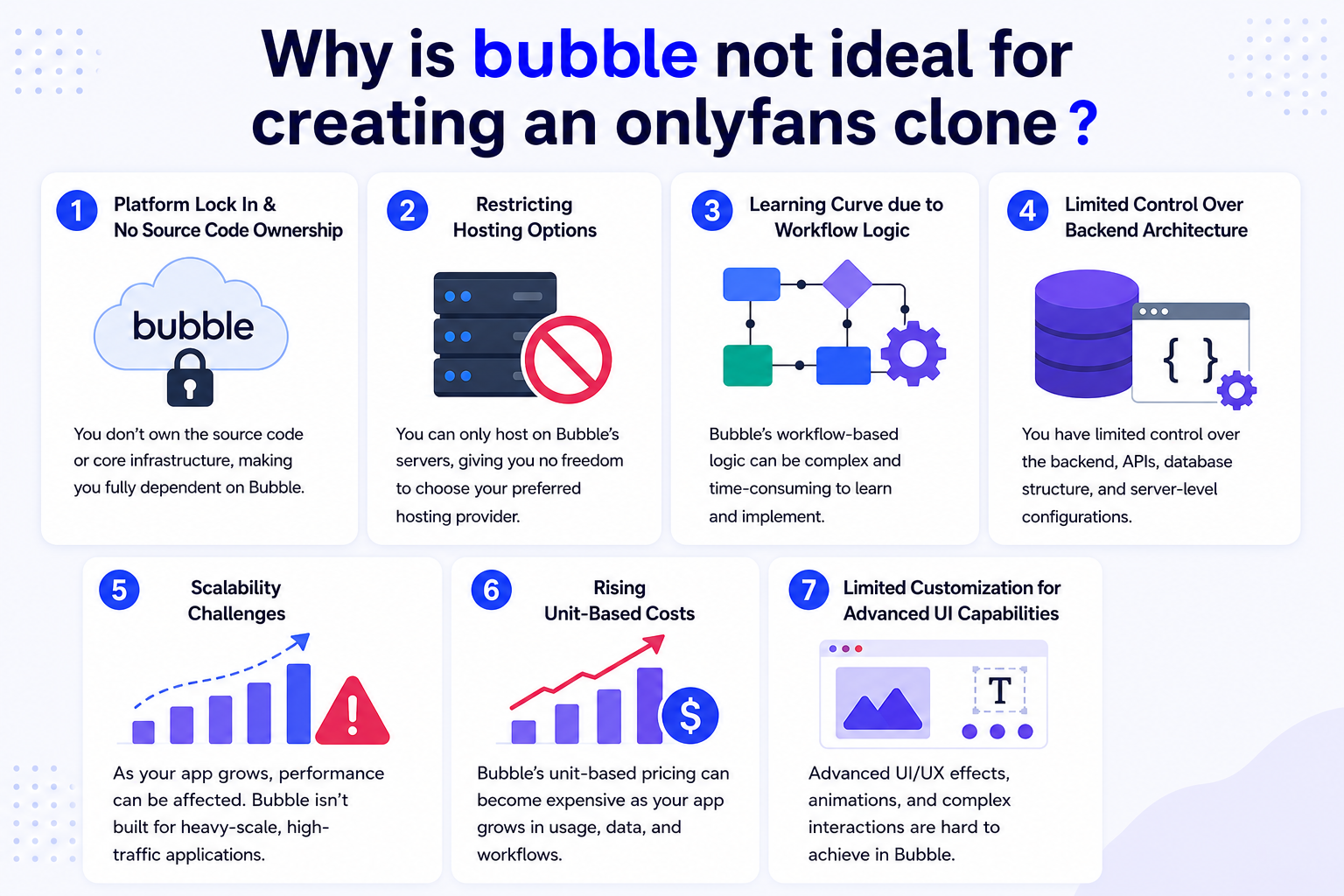
Here’s why Bubble might not be right choice for OnlyFans clone development:
1. Platform Lock In & No Source Code Ownership
One of the biggest problems with no-code tools is the platform lock-in. When you build an OnlyFans-like platform with Bubble, you don’t get the source code. The app is tied to Bubble’s infrastructure.
While you can decouple the front-end and back-end by connecting with an external database, this requires technical expertise. The vendor lock-in poses a significant risk for businesses and limits innovation, leaving them vulnerable to price increases and platform policies.
Lack of source code ownership hinders customization and platform growth. In contrast, self-hosted OnlyFans clone scripts offer more flexibility and control for OnlyFans clone development.
2. Restricting Hosting Options
Bubble restricts hosting to only Amazon Web Services (AWS). Businesses cannot host their platform on private or on-premises servers, which raises privacy concerns.
Even Bubble’s Enterprise plan runs on dedicated server instances where Bubble manages the servers. The only flexibility businesses get is region selection, static IP address and control over applying Bubble updates. You cannot host it on your AWS account.
Hence, Bubble’s no-code approach is not suitable for platforms with specific security or compliance requirements.
AWS hosting services can quickly turn expensive if the hosting and storage is not monitored. However, Bubble doesn’t charge separately for AWS hosting, everything is bundled into Bubble’s monthly subscription and work load costs.
3. Learning Curve due to Workflow Logic
Bubble is known for its significant learning curve: Developers have to spend weeks to months understanding the editor and workflows. The platform uses a visual workflow editor instead of traditional code. While this approach is convenient for simple applications, building a subscription-based website with a visual paradigm is tricky.
You have to manage everything from data types, privacy rules, and workflows with the editor. This makes the entire development process tedious and time-consuming, despite the no-code advantage.
4. Limited Control Over Backend Architecture
Bubble runs on a PostgreSQL database hosted on an AWS. The relational database allows users to build structured data models along with SQL queries and joins. However, it doesn’t expose the actual SQL interface, rather creates an abstraction layer. When it comes to complex applications, this abstraction layer limits scalability and is less suitable for high-performance workloads.
OnlyFans clone development needs custom APIs, media processing pipelines, and complex background jobs. Bubble doesn’t provide enough flexibility for complex backend tasks and its performance drops with large volumes of data.
5. Scalability Challenges
Powerful businesses scale up for performance from day one. However, Bubble is built for small businesses and projects due to significant performance and storage bottlenecks. Once your platform notices traffic spikes or data complexity, managing it gets tougher with Bubble. To scale up, you need to subscribe to workload add-ons, rely on pay-as-you-go overages, or set up workload caps.
Another significant challenge is its shared infrastructure for low-tier plans, where you share server resources with other platforms. Even the premium Bubble plans set up billing on workload units. So any additional usage can exhaust the monthly allocation.
Slow page loads, backend workflow failures, timeout errors and repeating groups performance issues can degrade the performance significantly.
“If you’re planning to scale your OnlyFans clone with hundreds to thousands of users, Bubble is not the obvious choice.”
6. Rising Unit-Based Costs
Bubble’s workload unit-based pricing model leads to unpredictable costs as you scale your business.
The platform’s pricing includes a monthly subscription plan plus workload units (WU). These units are measured based on server consumption and vary for each backend operation, like API calls, database searches, file processing, etc. If you exceed the allocated workload units in your pricing plan, Bubble charges an additional $0.30 per additional 1,000 WUs.
Additional costs include file storage, plugin subscriptions, domain and marketing costs. Scaling your platform further adds additional server costs and is more expensive than most alternatives.
7. Limited Customization for Advanced UI Capabilities
While the drag-and-drop interface brings ease of use, it is not suitable for highly interactive UIs or immersive experiences. As interfaces, states, and screens get complex, it gets harder to manage with Bubble.
Moreover, if your designers are seeking pixel-level precision, Bubble’s capabilities could limit their creative freedom. These limitations show that Bubble is more suitable for clear UI layouts and structured layouts, rather than experimentation.
Bubble.io Alternatives for OnlyFans Clone Development
If you need greater control, scalability and hosting with applications, look for Bubble alternatives. We have listed some better scalable, cost-effective, and highly customizable alternatives that address this limitation and are better suited for OnlyFans clone development.
1. Fanso (OnlyFans Clone Script)
Full Source Code Ownership and Self-Hosting Option
Pre-built OnlyFans Clone script by Fanso is one of the best development choices, given its 100% source code ownership. Businesses can modify the codebase, customize workflows, make UI tweaks and even integrate third-party services seamlessly. Unlike Bubble, there is no platform lock-in, reducing vendor dependency. Additionally, these clone scripts allow businesses to deploy their platform on a preferred hosting infrastructure.
Customization & Scalability Capabilities
Fanso offers unparalleled control over platform customization. Businesses can choose from its broad ecosystem of premium add-ons to enhance website functionality. Add a local payment gateway, a new revenue stream and AI recommendations without writing a single line of code. Fanso also excels in advanced UI customizations and tech integrations such as image compression, multi-server setup, or 2-factor authentication.
Cost-Effective in the Long Run
Its one-time pricing model costs a slight upfront investment, and reduces the long-term costs. Unlike Bubble, you don’t need to pay recurring monthly fees or workload unit costs. The best part is you own your platform and revenue, growing your profitability.
2. FlutterFlow
Native Mobile Applications
FlutterFlow is ideal for creating native mobile applications. So, if you are launching a OnlyFans platform for both web and mobile domains, FlutterFlow is the right choice. It also offers full control over the platform after initial development. When compared to Bubble, FlutterFlow offers greater scalability and source code ownership for OnlyFans development.
Export Code & Third-Party Integrations
One of the significant advantages of FlutterFlow is that you can export the entire project and open it in any Flutter environment. The exported code includes UI interfaces, config files, custom code, themes, etc. This reduces the vendor lock-in and provides more freedom to customize platform workflows or even refactor the code.
3. Custom Development
Full Development Control & Scalability
The traditional development approach with technologies like Next.js and Node.js offers full customization and development control. This approach is ideal for platforms with unique business needs or complex integrations. You can tailor your OnlyFans type platform as per business needs and even get superior scalability.
Ownership & Branding
Building an OnlyFans clone platform from scratch provides full platform ownership over source code and workflows. You control the development lifecycle, updates, design and functionality. Custom development helps to build a strong brand identity with unique visual aesthetics, workflows and brand voice.
When Using Bubble Makes Sense?
Despite the above limitations, Bubble is a strong choice for startups and businesses looking to scale faster. However, its usability largely depends on the use case and project complexity.
Choose Bubble for:
-
Simpler Project Ideas
If you are building a small-scale platform like a Micro SaaS application, Bubble’s pre-built functionality might be suitable. You can integrate payment gateways, databases, authentication and plugins without writing code.
-
Prototyping & Validating Your Idea
Bubble’s drag-and-drop interface makes it easier to convert ideas into functional prototypes. So, if you are testing a unique product idea or functionality, you can quickly get your platform off the ground.
-
You’re Not Planning to Hire a Development Team
If your company prefers visual no-code tools and doesn’t plan to hire developers, Bubble makes a good choice. However, this comes with several trade-offs: scalability, long-term costs, and limited customization.
Final Thoughts
Bubble is a valuable no-code tool for MVPs and simple projects, but it is not suitable for complex implementations like OnlyFans-style platforms. Vendor lock-in, limited customization, scalability issues and usage-based pricing are its potential drawbacks.
Alternatives such as OnlyFans clone scripts, FlutterFlow and custom development offer full source code access, code export feature and customization support. For businesses looking for sustainable costs and full source code ownership, Fanso is an excellent choice. Choose the right alternative based on your platform goals, scalability needs and budget.
FAQ-Related to Bubble Is Not Ideal for Creating an OnlyFans Clone
1. How to build an app like OnlyFans?
To start an OnlyFans-like website:
- Conduct market research
- Perform competitor analysis
- Choose a business model
- Understand the legal and compliance requirements
- Set up website fundamentals
- Decide on the platform features
- Choose either OnlyFans clone scripts or custom development
- Launch and market your site
2. Which is the best Bubble alternative for building an OnlyFans clone?
OnlyFans clone scripts offer full source code ownership and are highly customizable. Given that you’re launching a self-hosted OnlyFans site, you get more control and flexibility without any vendor lock-in.
3. Can I build a website like OnlyFans without coding?
Yes, OnlyFans clone scripts by Fanso and no-code tools like Bubble are two popular approaches for building OnlyFans-style platforms, minus any coding hassles.
4. Which OnlyFans development platform offers better scalability?
OnlyFans clone scripts are proven business models that support infrastructure scaling to accommodate growing traffic or global expansion.
5. How much does it cost to build an OnlyFans clone?
The cost of building an OnlyFans clone is approximately $30,000 to $1,50,000+ when building from scratch. Using OnlyFans clone scripts, you can build an MVP platform for $700 to $1500.
6. Can I migrate from Bubble to other platforms later?
Yes, you can migrate from Bubble to other development platforms later by transferring the data and logic. However, it’s tedious and time consuming.
7. Which OnlyFans clone development approach is ideal for entrepreneurs?
Entrepreneurs prefer a quick and affordable launch, which is possible with pre-built OnlyFans clone scripts and no-code tools.