TL;DR
- Multi-camera live streaming enables creator-based platforms to offer a dynamic, engaging and professional live streaming experience.
- Building a robust multi-camera streaming architecture involves multi-camera inputs, live video processing, audio synchronization, video encoding, streaming protocols, storage and CDN delivery systems.
- Incorporate features such as scene switching, picture-in-picture, multi-streaming, analytics, AI workflows, and live chat to enhance engagement and diversify platform revenue.
- Top livestreaming challenges are maintaining latency, synchronization, and building a scalable infrastructure. Best practices include synchronizing timestamps, implementing CDN systems, and choosing compatible streaming protocols for an excellent user experience.
Whether your creator platform is into gaming, fitness, or sports, livestreaming is a powerful medium for building strong relationships and deep fan engagement. But if your livestreams fall flat, the audience would quickly move to the next shiny platform over the internet.
Multi-camera livestreaming helps creators to add professional touch and dynamic appeal to their videos. While the feature is a valuable tool in every streamer’s arsenal, the technical infrastructure is what delivers the rich, power-packed live experience!
This blog explains everything you need to know for integrating multi-camera live streaming feature for a creator-based platform.
What is the Multi-Camera Live Streaming Feature? Why Does It Matter for Creator-Based Platforms?
Multi-camera live streaming is a broadcasting technique that helps to capture video content from multiple camera angles or sources in real-time simultaneously. During the livestream, creators can switch between camera angles or experiment with visual effects for depth, versatility and generate interest.
For instance, multi-camera livestreaming transforms audio-only podcasts into dynamic visual experiences. To keep viewers engaged, multiple shots such as wide angle and individual close-ups are captured simultaneously.
Similarly, creators can enhance their livestreaming in the same way. Although not on such a large scale, it is captivating enough to make your audience stick longer! Video streaming technology has evolved enough to sync multiple cameras into a single stream. Especially with software such as OBS Studio, Streamyard, and Switcher Studio.
Benefits of Multi-Camera Live Streaming Feature
Multi-camera livestreaming is a powerful feature for creator-based platforms.
Let’s see how it enhances your platform experience in multiple ways:
-
Audience Engagement
Engaging your audience is the primary goal for creator-based platforms. An amazing feature like multi-camera livestreaming captures the creator’s performance or content from different angles, providing an immersive visual experience. Whether it’s a live performance or a workout tutorial, switching multiple camera angles definitely keeps your viewers hooked.
-
Compelling Storytelling
Every livestream narrates a captivating story enthralling the audience. Be it a live concert, music performance, or a much-awaited sports event. With multiple cameras, you can capture the event from multiple angles, including close-up shots of the performance and even audience reactions.
-
Professional Video Quality
A multi-camera livestream makes the video content more appealing and engaging. Dynamic visuals, transitions effects, and broadcast-quality videos create a polished, professional look.
-
Audience Retention
When viewers feel right in the middle of the action, they watch the video for a longer time. When curiosity and engagement peak, they turn into paying subscribers and create new revenue opportunities.
How Multi-Camera Livestreaming Works: Core Technical Architecture
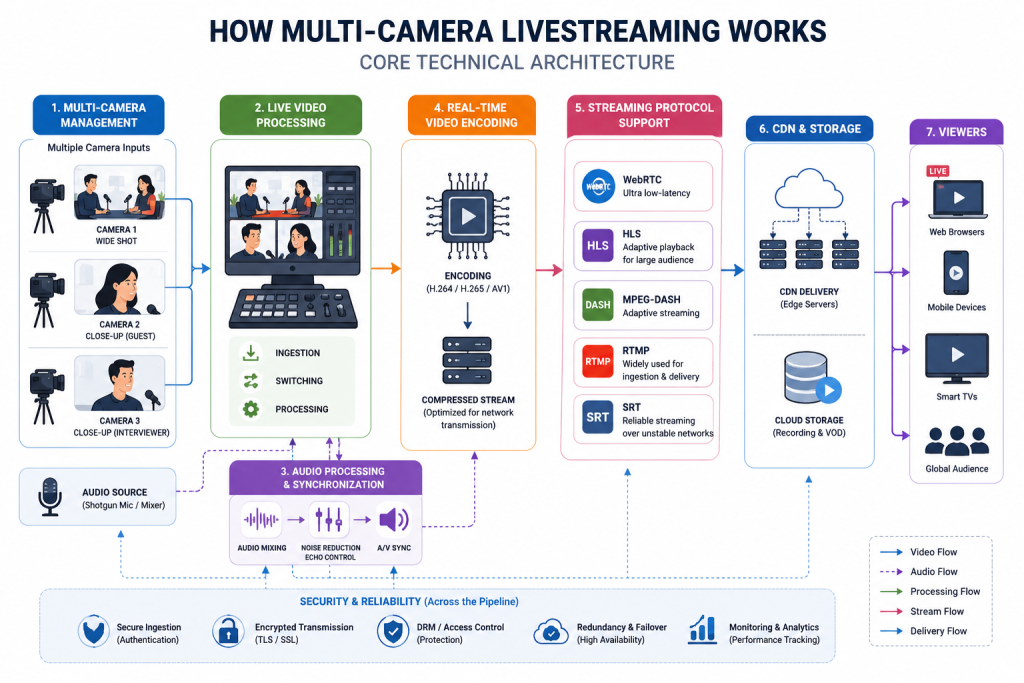
While multi-camera livestreaming is a broadcasting technique, there’s much that goes on behind the scenes. A robust livestreaming architecture involves handling video inputs, audio sync, security and streaming protocol compatibility. And only a well-planned infrastructure can deliver superior performance, security, and synchronization.
The following are the essential elements for a robust multi-camera livestreaming setup:
Multi-Camera Management
First off, you need to choose multiple camera sources for capturing the full picture. This doesn’t mean to get professional cameras, even consumer-grade gear can create seamless multi-cam livestreaming experiences. The key is the camera angle, right labeling so you don’t get confused and synchronization.
Here’s an ideal camera setup for interviews:
- Camera One (Wide Shot) – For two-shot frames between the interviewer and guest captured in one frame.
- Camera Two (Close-Up of Guest) – A close-shot of the interviewee placed at an angle slightly off the interviewer’s eyeline. Focuses on the guest’s subtle expressions and emotions to draw in the audience.
- Camera Three (Close on the Interviewer) – A tight shot of the interviewer, placed at the same angle as camera two. It captures shots of the interviewer speaking or reacting.
Live Video Processing
The live production engine is the central hub in a multi-camera setup. It captures the different video sources and processes them into the final output in real time. The workflow involves ingestion, switching, processing and the final output.
The video switcher is a key element that chooses between different audio and video sources. You can choose a hardware or software-based switcher, as per your preference.
Audio Processing & Synchronization
A flawless, high-quality audio is as important as the video experience. If your sound cuts out, appears to come from a distant source or shows latency, people disengage quickly.
The key is to source your audio from a single, reliable source, rather than keeping it tied to a single source. For example, fixing a shotgun mic at a fixed place captures sound from a specific direction. It works especially well for a desk or demo setup.
Real-Time Video Encoding
Before rolling out the livestream, encoding and streaming your video content is crucial. So, how does encoding help? It converts raw video files into a compressed digital format for better storage and easier transmission across the network. It uses codecs with complex algorithms for production-grade files, ready to be stored, shared or streamed.
Streaming Protocol Support
A streaming protocol is a set of rules for transmission across the Internet. Top streaming protocols include WebRTC, HLS, MPEG-DASH, RTMP and SRT. Each streaming protocol is designed for a specific purpose, evaluating your protocol’s compatibility with your streaming device. Take for example, WebRTC is designed for ultra-low-latency, while HLS provides adaptive playback for the largest audience.
CDN & Storage
A video CDN system helps in reliable and efficient content delivery for viewers worldwide. So, CDN is typically a group of connected servers that cache and deliver frequently requested information to a wider audience. The main goal is to minimize buffering and latency, and to reduce the load on the original server.
Essential Features for Multi-Camera Livestreaming
Multi-camera livestreaming is no longer limited to professional broadcasting. Today, the creator and e-commerce industry prioritize user-centric experiences, delivering seamless livestreams of video creators, bloggers or podcasters.
Here’s what you need to plan the right multi-camera workflow:
- Multiple Camera Inputs: Enable creators to connect with multiple camera sources such as DSLRs, webcams, smartphones, PTZ cameras, and screen shares. This provides more flexibility and a user-friendly interface for creating streaming pipelines and rolling out your stream!
- Scene Switching: Provide the option to choose between multiple camera angles, loop in a pre-recorded footage or screen shares to offer an immersive video experience.
- Multi-Streaming: Multi-streaming allows creators to broadcast a single stream across multiple platforms like YouTube Live, Facebook Live and Twitch simultaneously.
- Picture-in-Picture: This helps you display two video sources simultaneously, such that one camera source overlays another. Broadcasters can layer, organize, or resize the video feeds accordingly.
- Video Transitions & Effects: Allow creators to experiment with transitions like instant cuts, gradual fades, smooth slides, and elements like pop-up banners to move across scenes.
- Live Chat & Messaging: Enable fans to converse with their favorite creators in real-time for deeper interactions.
- Analytics: Provide actionable insights on livestream performance, user behavior, and engagement. This helps to optimize the video streams and maximize monetization opportunities.
- AI-Powered camera switching: AI workflows are simplifying multicamera livestreaming. From intelligent camera switching to subject tracking and audio mixing, AI can enhance user experience and reduce production costs.
Challenges & Best Practices for Multi-Camera Live Streaming Implementation
Here are a few stumbling blocks with installing a multi-camera setup:
1. Maintaining Latency Between Cameras
Using different video capturing methods for your video shoot can lead to performance degradation and reduce the effectiveness of live classes, tutorials or podcast sessions.
Solution: Ensure all cameras are using the same settings and protocol, preferably WebRTC. Optimize video encoding and use adaptive bitrate streaming.
2. Audio & Video Sync Issues
When you roll out multiple cameras, synchronization of every aspect is crucial. When in a dilemma, matching the footage with the audio might feel like much of a guesswork or an endless maze!
Solution: Synchronize the timestamps and frame timing, and rely on software-based sync (for DSLR or smaller mirrorless cameras).
3. Scaling for a Large Audience
As your platform audience grows, delivering a seamless performance without buffering or pixelated streams is a real challenge.
Solution: Use a scalable cloud infrastructure and CDN systems to manage bandwidth bottlenecks. Also, autoscale streaming resources based on demand.
Use Cases of Multi-Camera Live Streaming
So, here are the practical use case scenarios where switching to a multi-camera setup makes all the difference!
1. Online Education
Educators can use multiple cameras during live tutoring sessions to provide comprehensive coverage of the subject. For instance, the first camera captures the instructor, the second one captures the whiteboard or slide decks. This helps learners to grasp the concept better and make learning more engaging and interactive.
2. Fitness & Wellness
Whether it’s a yoga, pilates or HIIT training session, capturing from different angles helps learners to master every movement the right way. This also avoids confusion and improves learners’ satisfaction.
3. Gaming & Esports Streaming
An immersive gameplay stream is one that combines the game’s progress with the player’s reaction. Along with demonstrating gameplay techniques, it captures every win, loss and milestone reached, engaging the audience to the core!
4. Live Concerts & Music Performances
A multi-camera setup for live performance ensures the audience don’t miss a single moment of the event. From every rhythm and drumbeat to the artist’s signature move, it keeps the audience on the edge until the curtains fall.
5. Livestreaming for Creators
Livestreaming is revolutionizing the creator landscape and changing how content is consumed, stored and distributed worldwide. The modern audience demands engagement, immediacy, and authentic connections with their favourite creators. The astounding success of streaming platforms like YouTube prove the evident shift.
Global platforms like TikTok, YouTube, and Twitch are including livestreaming for audience growth and monetization to connect with diverse audiences. Creators can engage with live shows, Q&As, gaming challenges and behind-the-scenes content.
The livestreaming entertainment industry is an entire ecosystem with creators, agencies, platforms and users. Creators can monetize from direct audience support through donations and virtual gifting. Other platform native features include paid tickets, pay-per-view, subscriptions, advertising and brand sponsorships. Further, off-platform revenue includes digital products and merchandise.
Wrapping Up
Whether you’re building a multi-camera live streaming app or extending your live streaming with multi-camera support, this article definitely guides you through most of the technical aspects.
Implementing a multicam livestream feature is all about building a solid technology foundation. From high-resolution video scaling to latency switching and CDN storage systems, a successful livestream is a result of multiple functional aspects working in a close compendium.
Above all, simplify the entire multi-camera workflow to reduce friction and deliver an exceptional live streaming experience!
FAQ-Related to Multi-Camera Live Streaming Feature for a Creator-Based Platform
1. What types of cameras can be connected to a multi-camera livestreaming setup?
Webcams, smartphones, DSLR and mirrorless cameras, PTZs, camcorders, action cameras and screen sharing are different sources for a multicamera livestreaming setup.
2. Can creators switch between camera angles during a livestream?
Yes, creators can manually switch between camera feeds with streaming software or hardware switchers, providing dynamic and engaging livestream experiences.
3. What technologies are recommended for a multi-camera livestreaming setup?
Here are the top technologies suggested for a multi-camera livestreaming setup:
WebRTC ( low-latency), RTMP (stream ingestion), HLS (adaptive playback), cloud storage recordings, CDN and video transcoding are top technologies for multi-camera livestreaming.
4. How does multi-camera livestream improve engagement?
It captures video content from multiple angles and provides an immersive experience with visual effects and transitions, maximizing audience engagement. Different camera angles and compelling narratives add a polished, professional appeal and improve overall user retention.