TL;DR About OnlyFans Clone Script Demo
- Test the main fan and creator workflows, including subscriptions, locked content, creator registration, post publishing, pricing, and content access after purchase.
- Compare test purchases with transaction history and creator earnings to check commission deductions, pending balances, and payout records, and confirm whether payments are simulated or processed through a live gateway.
- Review the admin panel for creator approvals, content moderation, commission settings, transaction monitoring, payment disputes, and payout management to ensure it supports your planned operations.
- Before buying, compare the demo with the licensed package, confirm source code access and integration requirements, and identify extra costs for customization, installation, hosting, maintenance, and support.
An OnlyFans clone script may look ready for launch in a demo, but a polished interface does not guarantee that its core workflows will work as expected. Payment processing, creator earnings, content access, and administrative controls all need closer inspection before you commit to a purchase.
The best way to evaluate a demo is to test it from the perspectives of a fan, a creator, and a platform administrator. This helps you identify which features work as expected, which remain unverified, and which may require additional development or third-party integrations.
This guide explains how to test an OnlyFans clone script demo against your business requirements, what to confirm with the provider, and how to identify potential costs beyond the license fee before buying.
What to Look for When Evaluating an OnlyFans Clone Script Demo
Start by listing your essential requirements of Onlyfans clone and comparing them with the functionality available in the demo. Use the following checklist to identify what needs testing, technical clarification, or a separate cost estimate.
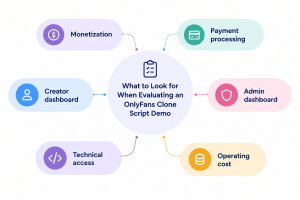
| Evaluation area | What to inspect | What to establish |
| Monetization | Subscriptions, pay-per-view (PPV) content, tips, paid messaging and livestreams | Which monetization workflows are functional and which require add-ons |
| Payment processing | Checkout, recurring billing, refunds, transaction records and creator payouts | Gateway compatibility, transaction handling and payout dependencies |
| Creator dashboard | Registration, profile management, content publishing, pricing and earnings | Whether creators can manage content and monetization independently |
| Admin dashboard | User management, creator approval, moderation, commissions and reporting | Whether administrators have the controls needed to operate the platform |
| Technical access | Source code, APIs,third-party integrations, branding and deployment | Customization rights, integration options and deployment requirements |
| Operating cost | Installation, hosting, extensions, maintenance, and updates | Initial expenditure and recurring costs beyond the license fee |
Keep this record throughout the evaluation. It will help you compare the script against your requirements and prepare specific questions for the provider.
Start with the Demo Dashboard
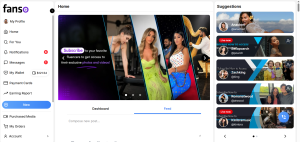
Begin with the fan-facing dashboard and test how users discover creators, review profiles, and move from browsing to checkout. The aim is to identify navigation problems and friction in the purchase journey.
Test Creator Discovery and Profiles
Check whether users can search for creators, browse profiles, and view content previews, subscription prices, and purchase options. Test profile links, navigation menus, and calls to action. Note any unnecessary steps, broken links, or unclear pricing that could interrupt the user journey.
Test Subscriptions and Locked Content
Use the demo account to check whether users can:
- View subscription prices and available options.
- Subscribe to creators and access subscriber-only content.
- Purchase locked posts and access them after payment.
- View subscription details and transaction history.
- Find renewal and cancellation options, where available.
Pay particular attention to access permissions by checking whether subscribers can view locked content after payment and whether their access is revoked when a subscription expires or is cancelled. If the demo cannot reproduce these scenarios, ask the provider to demonstrate how access restrictions are enforced so you can determine whether the OnlyFans script handles subscription-based content access as your business requires.
Check the Mobile Browser Experience
Repeat the main user flows on a mobile browser, checking profile layouts, media, navigation, checkout, and account settings for clipped elements, difficult-to-tap buttons, slow-loading media, and forms that are hard to complete.
Ensure the main interactions work across screen sizes, as a responsive layout alone does not guarantee a smooth mobile user journey.
Test Creator Registration and Content Publishing Flow
The creator dashboard of OnlyFans clone reveals how users set up profiles, publish content, and manage monetization. Use a creator demo account to test the available workflows.
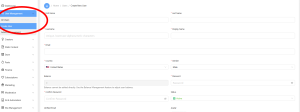
| Feature | What to test | What to confirm |
| Registration | Complete the signup process | Required fields, verification and approval steps |
| Profile setup | Edit profile details and upload media | Available fields and customization options |
| Content publishing | Create a post with text, images or video | Supported formats, upload limits and processing |
| Pricing | Set subscription prices or lock posts behind a payment | Available monetization options and restrictions |
| Post management | Edit, hide or delete published content | Whether changes take effect as expected |
| Earnings | Open the earnings dashboard | How revenue, commissions and pending balances are displayed |
Where possible, publish a test post and access it through the fan account. For paid content, confirm that access is granted only after the required purchase or subscription.
Also distinguish between earnings displayed in the dashboard and funds actually paid to creators. A balance shown on screen does not verify the payout process. If creator approval or payouts cannot be tested, ask the provider to explain the required setup and dependencies.
Follow the Fan Subscription and Payment Process
Once you have checked the fan-facing purchase journey, examine how the platform records and processes transactions. The goal is to establish whether payments, content access, and creator earnings remain consistent throughout the workflow.
Test Checkout and Transaction Records
Complete a test subscription or pay-per-view (PPV) purchase, if possible. Check whether the correct amount is charged or displayed, the purchased content becomes accessible, and the transaction appears in the fan’s history and admin dashboard.
Confirm whether checkout uses simulated payments or a live payment gateway. A simulated transaction can demonstrate the interface, but it does not verify live payment processing.
Check Renewals, Cancellations, and Refunds
Ask how the platform handles recurring billing, failed payments, cancellations, refunds, and disputes. Establish what happens to content access and transaction records when these events occur, and how any resulting adjustments affect creator earnings.
If the demo cannot reproduce these scenarios, request documentation or a provider demonstration. Do not assume that a working initial purchase proves the related billing workflows are complete.
Verify Payment Gateway Compatibility
Confirm which gateways the script supports and whether they accept your OnlyFans business model and target markets. Integration alone does not guarantee approval for adult content or access to a merchant account.
Check whether recurring billing and creator payouts are supported by the proposed setup or require separate integrations. The choice of payment gateways for creator platforms can affect billing options and payout support, so confirm who handles gateway configuration, account approval, and any custom development needed to make the payment flow operational.
Compare Transactions with Creator Earnings
After a test purchase, compare the transaction record with the creator’s earnings dashboard. Check how the platform calculates commissions, pending balances, and net earnings.
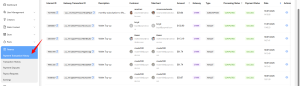
If the fan’s purchase appears in transaction history but not in creator earnings, investigate the discrepancy. It may reflect commission deductions, payout timing, or an incomplete integration. The provider should explain the calculation and expected behavior before you purchase the script.
Inspect Messaging and Fan Engagement Features
Messaging and fan engagement tools can support creator relationships and revenue beyond subscriptions. Test the features relevant to your business model rather than assuming that every option visible in the interface is functional.
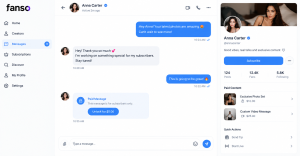
- Direct messaging: Check whether fans and creators can exchange messages and whether access can be restricted to subscribers or paying users.
- Paid messaging: Test whether creators can charge for messages or locked media sent through chat, if supported.
- Tips and paid interactions: Check whether users can send tips and whether the transactions appear in the relevant records.
- Notifications: Check the available notification types and whether users receive alerts for new messages and subscription activity.
- Livestreaming and engagement tools: If available, test livestream access, paid entry, and interactive features.
For each feature that matters to your business, establish whether it works end to end, relies on an external service, or needs a paid add-on. This helps you estimate the work required to deliver the intended fan experience.
Review the Admin Panel and Platform Controls
The admin panel for an OnlyFans clone shows how you will manage users, content moderations, and transactions after launch. Test the controls available to administrators and check whether they support your planned operating processes.
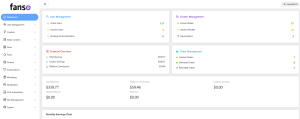
- User and creator management: Check whether administrators can view, edit, suspend, or remove accounts and approve creator registrations.
- Content moderation: Test how reported content is reviewed and removed, and whether moderation actions and account restrictions are recorded.
- Commission management: Verify whether platform commissions can be configured and whether deductions are reflected in creator earnings.
- Transaction monitoring: Check whether administrators can review payments, refunds, pending transactions, and creator balances.
- Reports and analytics: Review the available reports and determine whether relevant data can be filtered or exported.
- Admin permissions: Confirm whether different access levels can be assigned to staff members.
Pay attention to whether administrative actions take effect across the platform. For example, if an account is suspended, check whether its access changes as expected. If essential controls are missing, establish whether they are excluded from the license or require custom development.
Check Customization and Technical Access
A demo can show what the script does today, but your business may require different branding, integrations, or operating processes. Before buying, confirm that the license and technical architecture allow the changes you need.
- Source code access: Verify whether the purchase includes source code and permits modifications. Clarify any restrictions on access or redistribution.
- Branding and interface: Check whether you can customize the design, branding, and user experience to match your requirements.
- APIs and integrations: Confirm API availability and compatibility with required payment gateways, media services, and other third-party tools.
- Technology stack: Review the technologies used and whether your development team can maintain them or find suitable technical support. Your choice of tech stack for an OnlyFans clone-like app also affects integration options, customization, and long-term maintenance.
- Deployment requirements: Ask about hosting specifications, installation, server configuration, environment setup, and technical documentation.
- Security and permissions: Ask how authentication, role-based access, private media, and sensitive user data are protected. Request details of relevant security controls rather than relying on the demo interface.
- Backups and data portability: Confirm how the database and media are backed up, how recovery works, and whether you can export user and business data if you migrate to another system.
- Performance and maintenance: Ask how the platform is tested under load, what monitoring is available, and which party handles updates, bug fixes, and ongoing maintenance.
- Customization costs: Identify the features that need custom development, paid extensions, or separate integration work, and request estimates before purchase.
A demo alone cannot establish production security, performance under heavy traffic, or disaster recovery readiness. Ask for technical documentation or a demonstration of these areas where they are important to your launch. Also clarify any license restrictions and dependencies that could affect future development.
Compare Demo Features with the Purchase Package
The demo may show features that are not included in the license you plan to purchase. Compare the provider’s package details with your test results and confirm in writing which features are included, which require additional payment, and what extra costs you may face before launch.
- Included features: Confirm which features are part of the base package and which require paid add-ons.
- Feature limitations: Check for restrictions on messaging, monetization, media uploads, integrations, and user management.
- Third-party dependencies: Identify features that require separate subscriptions, merchant accounts, or external services, and establish who pays for them.
- Customization requirements: Request an estimate for configuration or custom development needed before launch.
- Installation and deployment: Confirm whether installation assistance, server setup, and deployment support are included.
- Support and updates: Verify the duration and scope of support, bug fixes, maintenance, and future updates.
- License terms: Confirm usage rights, deployment limits, and restrictions that could affect your business.
Use the findings to calculate the likely total cost, including the license, implementation, external services, hosting, and ongoing maintenance. Request written confirmation of significant exclusions, dependencies, and additional charges so you can compare providers on the same basis.
Conclusion
Evaluating an OnlyFans clone script demo requires more than checking whether the main features are visible and working. Test the platform from the perspectives of fans, creators, and administrators, paying close attention to subscriptions, payments, content access, creator earnings, and moderation controls. You should also confirm which features are included in the license, what requires additional development, and whether the script meets your technical and operational requirements.
A thorough evaluation helps you identify gaps before purchase, estimate the additional work needed before launch, and avoid unexpected costs later. If you’re planning to build an OnlyFans-style platform, compare available scripts against your business model, customization needs, and long-term plans. You can also consider Fanso’s OnlyFans clone solution as one option during your evaluation.
FAQ About OnlyFans Clone Script Demo
1. What should you check first when evaluating an OnlyFans clone script demo?
Start with the core workflows for fans, creators, and administrators. Test subscriptions, paid content, checkout, content publishing, earnings records, and user management. Prioritize the functions your business needs at launch.
2. Can you verify all features of an OnlyFans clone script through a demo?
No. A demo may restrict access to certain features or use simulated payments. It may not establish production performance, security, live payment processing, or the reliability of every integration. Record what remains unverified and request documentation or a provider demonstration.
3. What should you confirm with the provider before buying an OnlyFans clone script?
Confirm which features are included in the license, what requires additional development, and whether source code access, customization rights, integrations, installation, support, and updates are covered. Also request a breakdown of one-time and recurring costs.