Choosing the right tech stack is paramount for your OnlyFans clone’s success. It’s like laying a solid foundation for your platform with the right tools, technologies, and frameworks. But if you aren’t adept with modern technologies, this might be a stumbling block in development.
Tech stack selection is a multi-faceted decision influenced by project goals, scalability, UX, development time, cost constraints, and team expertise. This blog guides you on how to choose the right tech stack for your OnlyFans clone-like app.
Here’s what you’ll learn in this guide:
- Key considerations for choosing the right tech stack for your OnlyFans Clone-like App
- Recommended tech stack for your OnlyFans clone-like app
- Why use a ready-made clone script like Fanso?
Table of Contents
Key Considerations to Choose the Right Tech Stack for Your OnlyFans Clone Like App
The tech stack influences your platform’s performance, development timeline, scalability, and maintenance costs. Thus, the right stack is crucial for long-term success!
Before moving on to the tech stack selection, evaluate your OnlyFans clone’s core objectives. Your chosen tech stack must align with the following requirements:
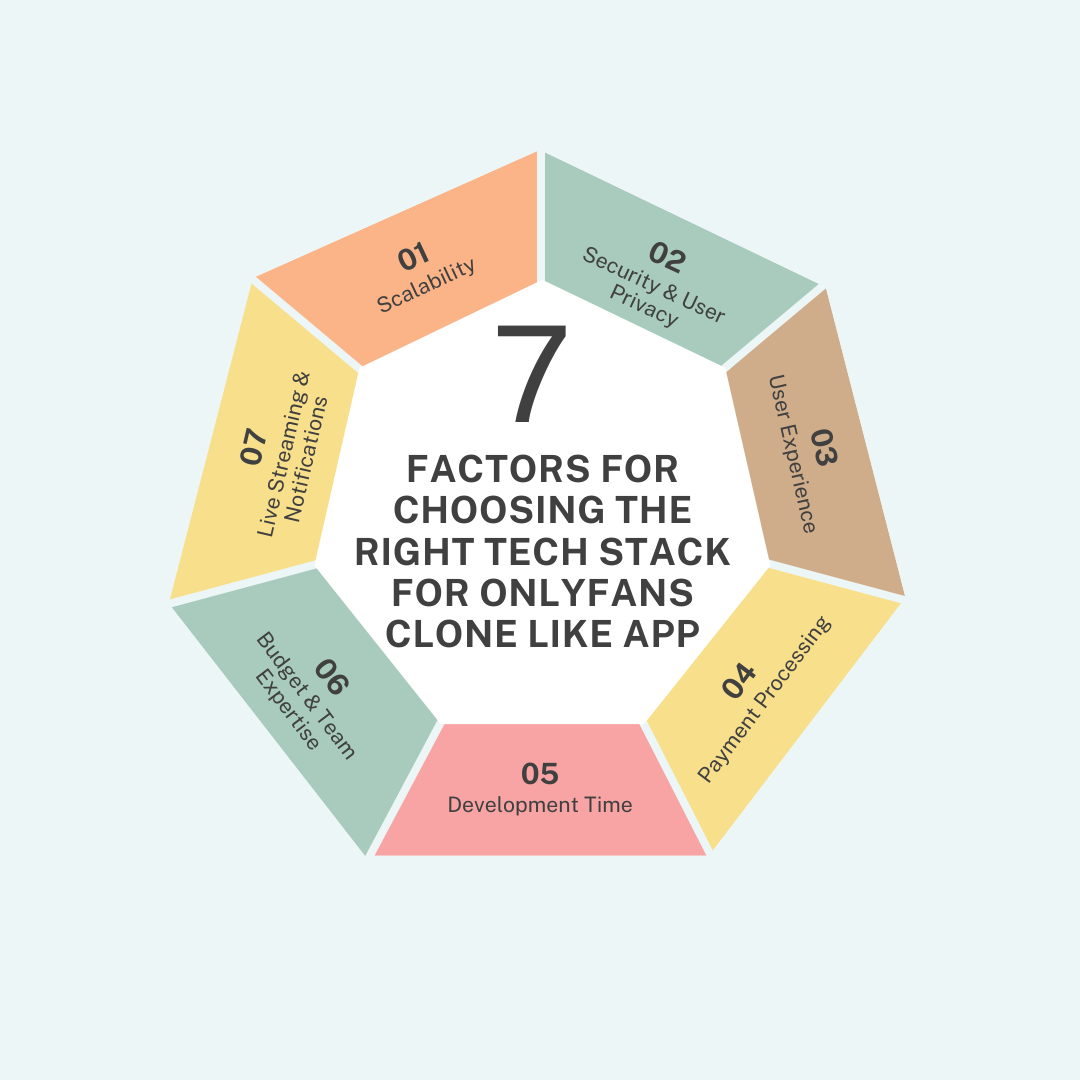
1. Scalability
Forward-thinking your tech stack while building your OnlyFans clone might seem too futuristic. But, it saves your time, money and avoids growing headaches down the line!
Here’s what scaling your OnlyFans clone might look like:
- Horizontal & Vertical Scaling: Scaling up and scaling out are essential aspects of platform growth. While horizontal scaling involves adding more servers to your system, vertical scaling means ramping up your server resources. Not all tech stacks support horizontal scaling, so choose the right one if you expect scaling both ways.
- Cloud Storage Infrastructure: AWS, Azure, and Google Cloud help in auto scaling, allowing horizontal and vertical scaling. Overall, this ensures user experience and performance even in periods of peak traffic and downtimes.
- Content Delivery Network (CDN): If your audience is from different locations, you need a CDN. It caches static, dynamic, and video content to improve your site speed. Popular CDN providers like Cloudflare, AWS Cloudfront, and Akamai offer scalable content delivery networks.
- Enhancing Feature Set: Enriching your platform’s feature set is a part of the scaling game. While platform features largely vary, choosing specific technologies and frameworks makes development and integration much easier.
2. Security & User Privacy
From DDoS attacks to SQL injections, the internet is rife with common threats. Choosing tech stacks that build a secure system and protect data and privacy is crucial.
Here’s a list of essential security aspects to evaluate:
- Built-in Security Features: Choose tech stacks with built-in security features like protection against input validation, cross-site scripting, SQL injections, and output encoding.
- Data Encryption: Creator platforms host highly sensitive user data. Implement technologies that encrypt data at rest and in transit, and provide support for SSL and TLS algorithms to avoid any data leaks.
- Authentication and Authorization: Security measures, such as OAuth, 2-factor authentication, prevent unauthorized access and level up platform security.
- Compliance: OnlyFans clone platforms need to comply with specific industry standards, such as PCI-DSS, GDPR, and privacy laws like CCPA. Choose tech stacks that support these compliance standards.
- Community Support: Look for established libraries and frameworks with a proven security track record and community support.
3. User Experience
A seamless UX experience is paramount for modern users and determines how long they will stay on the platform. User interactivity, speed, performance, and accessibility are core elements for a smooth user experience.
Here’s how the right tech stack impacts the final user experience:
- Interactivity & Responsiveness: Well-chosen tech stack provides an easy, intuitive, and responsive experience for mobile users. In contrast, poor tech stacks provide slow, clunky experiences.
- Front-end technologies: React.js and Vue.js are great for building dynamic interfaces and fluid experiences.
- Back-end technologies: Front-end interfaces battle with slow loading, errors, and even security glitches without the right back-end technologies. Node.js and Django power even complex UIs and offer stability.
- Personalization and Customization: Front-end and back-end functions work together to put forth an engaging platform experience. While the front-end collects relevant user insights, the back-end stores these preferences and tailors content accordingly.
4. Payment Processing
A secure payment gateway is an essential part of OnlyFans clone platforms. Hence, payment integrations are often considered when choosing the tech stack. A reliable and robust payment gateway helps to accept transactions and ensures PCI-DSS compliance.
A complete payment stack includes payment processors, gateways, PSPs, merchant accounts, billing software, and checkout interfaces.
Here’s how the right payment stack affects your business:
- Reliable Payment Providers: Stripe and PayPal integrations support multiple methods like digital wallets, credit/debit cards, and local payments. It accepts recurring payments (subscriptions) and one-time payments (tips, PPVs).
- Security and Compliance: Tech stack must support PCI-DSS compliance and chargeback flows for a secure and user-friendly experience.
- Customer experience: Popular payment gateways like Stripe accept multiple payments and pre-built checkout pages and UI-rich elements for faster payments
- Revenue optimization: A better checkout experience and flexible pricing model drive conversions and platform revenue.
- Global payments: Ensure your tech stack integrates with global and local gateways for global payments and creator payouts.
5. Development Time
The creator community landscape is fiercely competitive. Hence, quick deployment and shorter software cycles are an essential business edge! A longer time-to-market can often make your project more expensive.
Consider these factors for development time:
- Pre-built frameworks and libraries: You don’t need to reinvent the wheel in development. Pre-built libraries and frameworks can reduce the development time.
- Cross-platform technologies: Flutter and React Native allow for quickly scaling up an app on both iOS and Android with a single code. Choosing the MERN tech stack helps to build an MVP and aim for quick deployment.
- Learning curve for technologies: Opt for simple technologies and frameworks with a less steep learning curve to speed up development.
6. Budget & Team Expertise
Cost and team expertise are crucial to choose the right tech stack for your OnlyFans clone-like app. Certain technologies, like Django(Python), provide a well-structured environment, cutting down on overall cost.
Evaluate the following financial aspects and the team’s skills:
- Developer’s Rate: Skilled developers and high-demand technologies charge a higher developer rate. Use familiar technologies with a large pool of developers to reduce the overall cost. For example, JavaScript is a popular web technology, and it’s easier to find developers if you use this technology.
- Licensing Fees & Maintenance costs: Proprietary and enterprise-grade solutions account for more licensing fees. Instead, opt for open-source frameworks to lower the cost. However, consider the cost of ownership integration and maintenance costs for building a scalable OnlyFans clone.
- Hosting Costs: Building an OnlyFans clone involves hosting fees for cloud-storage services like AWS and Google Cloud. Moreover, these reliable cloud providers also offer affordable hosting plans, rather than on-premises solutions.
- Ready-made Solution: Aiming for a quick yet powerful launch? Ready-made OnlyFans clone scripts like Fanso.io are the fastest path to building your OnlyFans clone. With all the essential features and robust front-end and back-end, you can launch your OnlyFans clone within weeks! Check out the quick walkthrough to see how Fanso fits into your business needs.
7. Live Streaming & Notifications
Real-time communication happens in an OnlyFans clone through live streaming, instant messaging, and notifications. A seamless real-time system requires a combination of front-end and back-end technologies on your OnlyFans clone.
Here are the key technologies and frameworks for built-in real-time updates:
- Front-end technologies: Use React, Vue.js, and Angular to build dynamic UIs and reusable components that update in real-time.
- Back-end technologies: Web application frameworks like Node.js and Express use APIs to handle WebSocket connections.
- Real-time communication technologies: WebRTC, Socket.IO, and Firebase are key technologies for smooth interaction between platform users. WebRTC is a flexible communications protocol enabling high-quality audio, text, and video streaming between browsers and devices.
- HLS: It is a HTTP live streaming protocol with adaptive bitrate streaming for high-quality video.
What is the Recommended Tech Stack for Your OnlyFans-Like App?
Tech stack impacts the performance, scalability, integrations, stability and UX of your OnlyFans clone. A better and optimized performance ensures the long-term success of your OnlyFans clone.
Recommended Tech Stack for OnlyFans Clone
|
Technology |
Recommended Tech Stack |
| Front-end Technologies | React.js, Vue.js, Next.js
Mobile Technologies: Cross-platform technologies (Flutter and React Native) |
| Back-end technologies | Node.js, Ruby on Rails, Django (Python) |
| Database | MongoDB, PostgreSQL, MySQL |
| Payment Processing | Stripe, PayPal, CCBill (for adult business) |
| Live Streaming | Agora, WebRTC |
| Media Storage & CDN | Amazon S3, Azure, Google Cloud, Cloudflare & Amazon Cloudfront (CDN) |
Here’s the suggested tech stack for your OnlyFans clone:
1. Front-end Technologies
From easy login to hosting a livestream, front-end technology powers all the engaging platform interactions.
- React.js: React or React.js is an open-source JavaScript library for building complex UIs and fast rendering. It is a versatile technology and is used for single-page applications. The main advantage of React is that it has reusable components for faster development, easy bug fixes, and efficient and cleaner code.
- Vue.js: Another popular JavaScript framework for building UIs. It is built on top of HTML, CSS, and JavaScript with an intuitive API. Vue is lightweight and comes with an easier learning curve, making it a preferred choice for building applications.
- Cross-platform technologies: Flutter and React Native are popular mobile technologies that help to build for both iOS and Android with a single code. Flutter is a UI toolkit created by Google for building both web and mobile applications from a single codebase. React Native is an open-source software framework based on Facebook’s React library for cross-platform mobile apps.
2. Back-end Technologies
These technologies include programming languages, frameworks, databases and servers that rule the backend scene. Data-handling, business logic, and server communication are handled by back-end technologies.
- Node.js: Node.js is non-blocking, event-driven and recommended for data-intensive applications. It is particularly known for its real-time capabilities, scalability, and remarkably fast speed.
- Ruby on Rails: Ruby on Rails is a server-side development framework focusing on rapid development and productivity. It focuses on DRY and convention over configuration for faster launch of your platform.
- Django (Python): Django is a high-level Python framework perfect for rapid and secure development. It is a free and open-source web framework with several reusable modules for common tasks like user authentication, content administration and site maps.
3. Database
Databases store all your platform information and retrieve it when required. They are responsible for back-end processes like authentication and API support for front-end applications.
- MongoDB: MongoDB is a well-known open-source NoSQL database system that’s light, flexible, and quick to use.
- Redis: It is an open-source and high-performance database, and the world’s fastest in-memory database. It seamlessly integrates with any tech stack, helping to build, scale, and deploy your platform.
- PostgreSQL: One of the most popular and frequently used databases, PostgreSQL is known for its reliability, performance, and feature set. It manages both structured and unstructured data and provides security mechanisms.
- MySQL: It is a free and open source relational database that offers greater speed and reliability. It supports both structured (SQL) and unstructured data (JSON).
4. Payment Processing
A secure payment infrastructure is crucial for accepting payments for subscriptions, tips, and PPVs. Choose a payment gateway with multi-currency support, PCI-DSS compliance, and recurring payment support.
- Stripe: Stripe is one of the most popular payment providers for secure payment processing. It supports multiple payment methods and APIs for handling recurring payments. Stripe offers encryption, tokenization, 3D Secure, and multi-factor authentication and is suitable for non-adult businesses.
- PayPal: PayPal is another popular payment gateway and is used alongside Stripe for OnlyFans-like platforms. It has a comprehensive suite of tools, from direct PayPal to PayPal commerce, building a convenient and robust payment system.
- CCBill: CCBill is a trusted provider of adult merchant accounts with over 25 years of industry experience. It supports all types of business models, from fan sites to adult cam sites. Regulatory compliance, no account freezes, risk mitigation makes it a preferred choice for adult businesses.
5. Live Streaming
Live streaming and one-to-one video calls are an excellent way to engage your audience and monetize your platform.
- Agora: Agora is a popular communication API for creator platforms. It provides interactive live streaming and ultra-low latency for seamless live-streaming without delays. It’s also crucial to look for monetization, security, and interactivity features like real-time chat and tipping while choosing your live streaming platform.
6. Media Storage & CDN
A robust content management system helps in efficient content delivery, scalability and moderation.
- Cloud Storage Services: Amazon S3, Azure, and Google Cloud are popular cloud storage services for storing media content. Using cloud storage ensures high availability, scalability, and cost efficiency for accessing files.
- Cloudflare & Amazon Cloudfront (CDN): It is a distributed network of servers that minimizes delays and offers high-quality video streaming. This ensures seamless data-streaming during periods of high traffic and massive data load.
7. Integrations & Analytics
Creator analytics helps to track earnings, post views, and fan engagement. It provides valuable insights to make well-informed decisions. On the other hand, the admin can analyze overall business revenue, commissions, payments, and subscriptions with the dashboard and reporting tools.
Here are the key analytics tools:
- Analytics: Tableau, Power BI, Grafana, Looker Studio (formerly Google Data Studio)
- Integrations: Sendgrid (mail automation), Google Analytics (SEO & performance)
Well, these are the key factors to choose the right tech stack for your OnlyFans clone-like app. But, if you aren’t a tech wizard, here’s a quick fix!
Why should you use the Fanso OnlyFans clone script?
In today’s ever-evolving technology landscape, selecting the appropriate technology stack is a real challenge. The industry is flooded with new technologies, tools, and frameworks, leading to “ paralysis of choice.”
Other common challenges for choosing the right tech stack include:
- Talent and skill availability
- Scalability and flexibility
- Integration challenges
- Maintenance and support
- Total cost of ownership and long-term costs
- Performance and UX
Using a ready-made OnlyFans clone script of fanso saves you from the dilemma of tech stack selection. With the best-in-class tech stack, the platform allows you to scale your business without worrying about the tech stack!
From live streaming to in-built payment processing and power-packed analytics, Fanso is the ultimate solution for launching your OnlyFans clone. Want to know more about Fanso’s tech stack? You can check the detailed documentation.
And that’s not it! For business-specific customizations, Fanso has a premium range of add-ons to enhance your platform functionality. Fanso comes at an affordable one-time cost, along with free installation and free updates for 6 months. Contact our team to launch your OnlyFans clone and hit all the marks on the checklist!
Conclusion
Choosing the right tech stack is one of the most crucial decisions for OnlyFans clone development. Evaluate your project’s goals, features and requirements to settle for the right tech stack. Decide whether you’re building a simple or a dynamic OnlyFans clone and choose the tools and technologies accordingly.
Pre-built scripts offer obvious advantages: quick deployment, affordable cost, proven feature-set, and a highly customizable solution. So, if choosing the right tech stack seems like a maze, Fanso will help you to define your complete development roadmap!
FAQ-Related to Choosing the Right Tech Stack for Your OnlyFans-Like App
1. What is the right tech stack for your OnlyFans Clone app?
Here’s the recommended tech stack for an OnlyFans-like app:
- Front-end technologies: React.js, Vue.js, Next.js, cross-platform technologies (Flutter and React Native)
- Back-end technologies: Node.js, Ruby on Rails, Django (Python)
- Database: MongoDB, PostgreSQL, MySQL
- Payment Processing: Stripe, PayPal
- Live Streaming: Agora, WebRTC
- Media Storage & CDN: Azure, Amazon S3, Cloudflare, Google Cloud, & Amazon Cloudfront (CDN)
2. What are the key security features for building an OnlyFans clone-like app?
Below are the essential security features:
- Data encryption
- OAuth & 2-Factor Authentication
- DRM
- Role-based access control
- Audit logs
- Content moderation
- DDoS (Distributed Denial of Service)
3. What are the third-party integrations for the OnlyFans clone?
Payment processing, video streaming, email marketing, scalable cloud storage (AWS, Google Cloud), and analytics are popular third-party integrations.
4. How can OnlyFans scale from 100 to 1 million users?
Here’s how to scale your OnlyFans clone:
- Translation & localization for scaling across demographics
- Diversification of revenue streams
- Scale performance with horizontal and vertical scaling and load balancing
- CDN networks to accelerate site speed
- Microservices and cloud-service architecture
- Improve authentication, encryption, and content security