
Planning to build a website that monetizes from exclusive content? Then, subscriptions are not the only revenue stream to count on. Pay-per-view is one of the fastest-growing monetization models with video streaming capturing 39% of the creator economy’s revenue.
Whether you’re setting up a sports streaming service or an on-demand entertainment website, in this blog, we explore the key steps to building your PPV website. You’ll learn what a pay-per-view site is, how it works, easy steps to develop a PPV site, the right approach and successful examples.
TL;DR
- A pay-per-view website is a platform that monetizes from premium content, including livestreams, on-demand, or exclusive content for a one-time price.
- Unlike subscriptions, users can access individual content pieces without committing to long-term payments. The content is locked behind a paywall, and users can access it with a one-time payment.
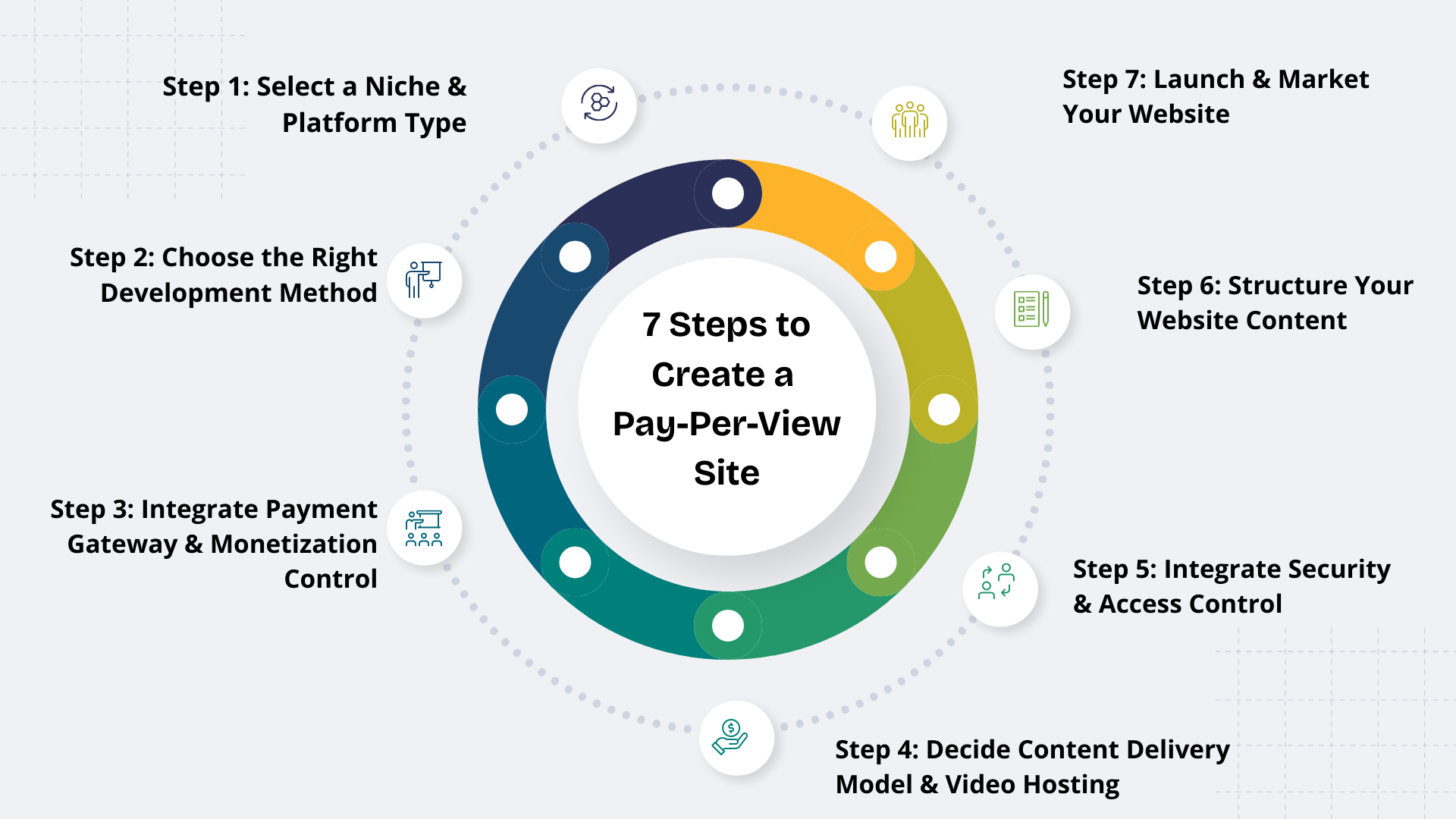
- To create a pay-per-view website, choose a niche, determine your development approach, set up a payment and monetization system, choose content delivery & video hosting options, integrate security, organize content, launch and market your PPV site.
- Generally, live concerts, exclusive sports events, fitness workout series, and educational content are popular PPV content types.
Table of Contents
- 1 What is a Pay-Per-View Site?
- 2 How Does Pay-Per-View Work?
- 3 Key Characteristics of Pay-Per-View Website
- 4 Key Features of Pay-Per-View Website
- 5 How to Create a Pay-Per-View Website?
- 6 Which Content Works Best for Pay-Per-View?
- 7 Key Differences Between Pay-Per-View Vs. Subscription Website
- 8 Examples of Pay-Per-View Websites
- 9 Final Thoughts
- 10 FAQ-Related to How to Create a Pay-Per-View Website
What is a Pay-Per-View Site?
A pay-per-view site is an online platform that monetizes by selling premium content, such as on-demand videos, livestreams, and exclusive content for a one-time price. PPV content offers exclusivity, flexibility and better user experience.
While traditional subscription models require users to commit to monthly subscriptions, pay-per-view websites allow them to unlock access to individual content pieces. The encryption and security controls protect content from unauthorized access.
How Does Pay-Per-View Work?
Imagine you’re viewing an action-packed UFC fight. Have you ever wondered how PPV exactly works? Basically, pay-per-view websites provide access to premium content by charging a specific fee.
Here’s how it works:
- The platform or creator uploads exclusive content and locks it behind a paywall. Users can view the teaser and price of the content.
- Users unlock the content by making a secure payment through a card or a digital wallet.
- Once the payment is done, the user is granted an access token through an exclusive link or code.
- Finally, they get a personalized and secure viewing experience of the PPV content.
- The duration of access depends on the content type. For example, live PPV is available only until the event is live, while exclusive content purchases offer lifetime access.
Key Characteristics of Pay-Per-View Website
Essential characteristics for pay-per-view websites:
- One-time Purchase: Unlike subscriptions, users don’t need to commit to monthly payments and access a specific content piece for a one-time fee.
- Instant Content Access: Users can instantly access live events or exclusive posts from their favorite creator instantly after making the payment. On the contrary, there is an extensive waiting period for long-term subscriptions.
- Access Control & Viewing Limitations: PPV sites implement different security mechanisms, such as paywalled content, authentication, geo-blocking, device limits and session timeouts. This protects content and ensures strict privacy controls.
- Pricing Control: Pay-per-view content offers flexible pricing with multi-tiers access, time-based discounts, bundles, etc.
- Multiple Content Formats: Videos, posts, audios, webinars and live broadcasts are different forms of PPV content.
“Direct-to-consumer monetization models like PPV are becoming essential as creators seek independence from platform algorithms.”
—Strategy Team Insights,Patreon
Key Features of Pay-Per-View Website
To build a successful pay-per-view website, you need to plan all the features and functionalities beforehand. Here are the must-have features for your pay-per-view website:
- Secure paywall: Build a secure paywall that users can unlock with a one-time payment and integrate with a secure payment gateway like Stripe or PayPal.
- Livestreaming: Integrate with livestreaming software like Agora for seamless content experiences. Add features like chats, tipping, and notifications for more engagement.
- Multi-currency: Support local currency display and conversion, multiple payment methods, and language translation features in your website.
- Security & Access controls: Embed DRM, tokenized URLs, data encryption, watermarking, geo-blocking, and device limits to enhance security and privacy measures.
- Content Creation & Management: Provide built-in tools to create, upload and manage content, a user-friendly interface, and collections features.
- Multimedia Support: Ensure your platform supports different content types like videos, livestreams, posts and audio files.
- Admin Panel & Analytics: A dedicated admin dashboard helps to track and manage sales, engagement, revenue, and keep a bird’s-eye view on your platform.
- Compliance & Moderation Tools: Leverage AI tools and human-review for content moderation to ensure guidelines are followed.
- Coupons: Built-in tools for limited-time discounts, early-bird offers, and loyalty programs for subscribers help to attract and retain the audience.
How to Create a Pay-Per-View Website?
Here’s a step-by-step guide on how to create a pay-per-view website:
Step 1: Select a Niche & Platform Type
Choosing a niche depends completely on your platform vision. Are you planning to build a classic platform for live music concerts? Or a sports platform for major boxing fights and esports tournaments? Or a digital marketplace for products, premium content, and PPV-style pass?
A “generic PPV site” doesn’t appeal to your audience. Narrowing down the niche helps to build authority and influence your marketing, pricing, and content delivery model. Also, validate your niche and ensure there’s significant audience demand for it before stepping in.
Step 2: Choose the Right Development Method
Before you build your PPV website, you need to choose the platform.
Here are the top development approaches for pay-per-view websites:
| Comparison Aspect | Ready-made Creator Clone scripts | CMS platforms like WordPress | Building from Scratch |
| Time-to-market | Fast (5-6 days) | Fast (days or weeks) | Slow (6 – 8 months) |
| Cost | Low | Low Initial Cost (Long-term costs for plugins and integrations) | High |
| Scalability | High | Limited | High |
| Customization | High | Limited | High |
| Coding Knowledge | No | Needs technical expertise | Requires Coding Skills |
| Security and Access Control | High | Limited | High |
| Ownership and Control | Complete Ownership (Self-hosted PPV website) | Full or Limited Ownership (depending whether you host on WordPress.org or WordPress.com) | Complete Ownership |
Evaluate setup time, platform cost, content delivery, security and paywall features before settling on a development approach. With ready-made clone scripts like Fanso.io, the paywall features, monetization, and payment gateway flows are already configured, and you don’t need to build everything from ground up.
Step 3: Integrate Payment Gateway & Monetization Control
Integration with PCI-DSS-compliant payment gateways is an essential part of PPV websites. When a user clicks on PPV content, a payment window prompts for a one-time fee and directs to the specific payment gateway. Once the payment is successful, the user unlocks the content access.
Well-known payment gateway providers include:
- Stripe
- PayPal
- Paddle
- BrainTree
- Square
- Local payment gateways like Pix and Boleto (Brazil), iDEAL (Netherlands)
Next, how would you price your PPV content? This entirely depends on what kind of content you’re offering. For example, a much-awaited live performance or tour costs $19 to $50, while records or albums cost around $5 to $25.
Another important thing is your PPV pricing model. It decides how users will access your platform content.
Different PPV pricing models include:
- Time-limited access
- Purchase/ Unlimited Access
- Live PPV
- All-time access subscription (Live + on-demand access)
- Bundles
Step 4: Decide Content Delivery Model & Video Hosting
If you desire a superior platform experience for your audience, seamless video content delivery is important. A smooth, glitch-free video experience helps to improve user satisfaction and retention.
Here are essential elements for an efficient content delivery:
- Video Hosting: You need a reliable and secure hosting provider to upload and store your video content files online. Choose either cloud hosting or third-party hosting software (SaaS offerings).
- Content Delivery Model: Livestreaming, on-demand access, and time-limited viewing are the different PPV content delivery models.
- CDN/Multi-CDN Network: CDNs help distribute your content across servers around the globe to reduce latency and improve performance.
- Adaptive Bitrate Streaming: This technology delivers high-quality video based on network speed and device resolution.
- HLS/WebRTC Protocols: Choose a live streaming software like Agora that supports HLS or WebRTC protocols. This maintains seamless connection and access from different browsers and devices.
Step 5: Integrate Security & Access Control
Protecting your content and privacy controls is a priority for platform owners.
Here’s how you can implement it in PPV websites:
- Data Encryption: AES encryption (video content) and HTTPS (in transit) help to encrypt data and ensure only authenticated users can access it.
- Digital Rights Management: Highly recommended for exclusive content like sports, performances, concerts, and premium courses. DRM provides strong piracy protection and prevents unauthorized downloads.
- Watermarking: Invisible watermarking helps to prove content ownership and avoid data leaks.
- Access Controls: Geo-blocking, session timeouts, tokenized URLs, etc., provide total control over website content.
- TOS and privacy policies: Create clear, transparent and detailed terms of service addressing refund, content restrictions and privacy policies.
Step 6: Structure Your Website Content
Once you have built your website and prepared content, it’s essential to structure it. This involves organizing your content into specific sections, playlists or categories. You can even create dedicated pages for each content type, like livestreams, videos, or genres.
For example, Veeps website includes different categories such as “top songs”, “new on-demand”, “Top 10 in the US”, and “coming soon”.
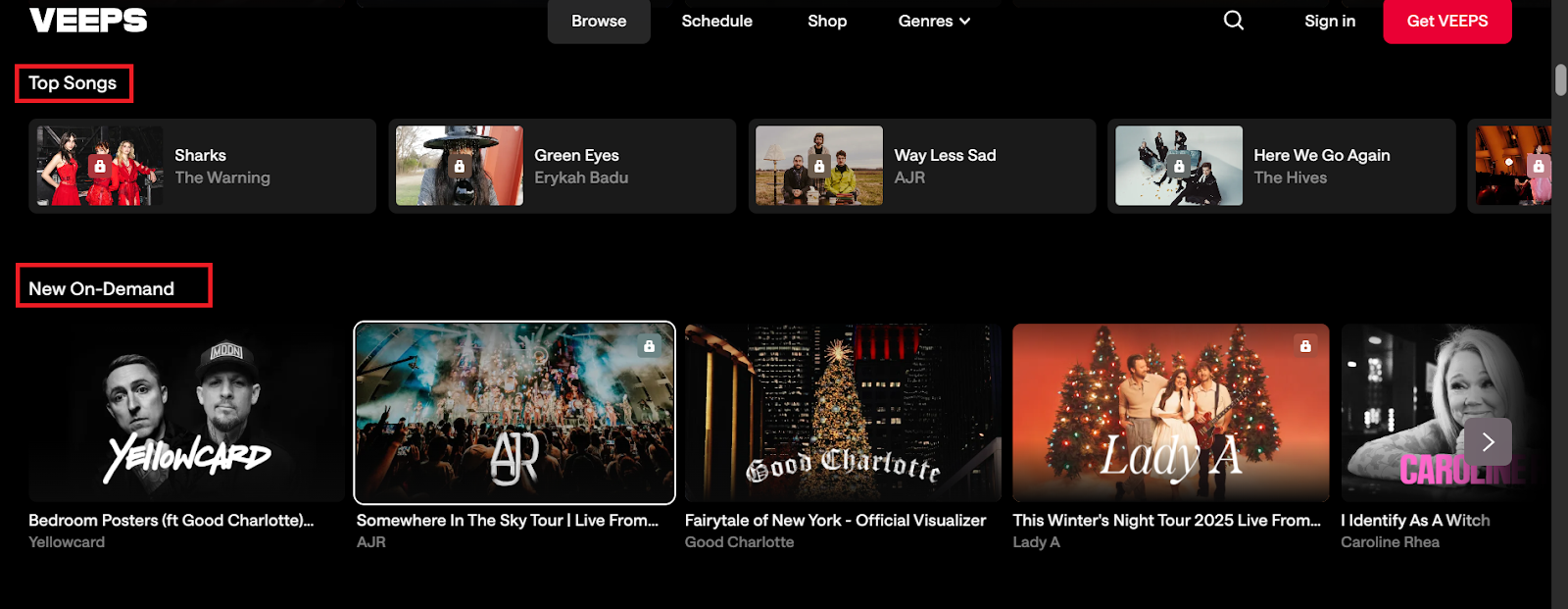
Popular categories on the Veeps website
Further, add descriptions and meta tags for easy navigation and content discovery.
Step 7: Launch & Market Your Website
Now your website and content are ready to be launched and made available for a wide audience. Promote your website across key marketing channels, especially where your target audience most likely hangs out.
Effective marketing strategies to boost your website reach include:
- Social media marketing
- Influencer marketing
- Paid ads
- Brand sponsorships
- Email marketing
- SEO
Monitor and track your website’s performance, engagement, and content sales over time. Adjust your monetization and marketing strategies for long-term growth and success.
Which Content Works Best for Pay-Per-View?
Content is the core of your PPV platform experience! Users are willing to pay for niche-related, exclusive, time-specific, and highly anticipated events.
The following type of content works best for a pay-per-view website:
- Live concerts and exclusive music shows
- Major sports events and tournaments
- Influencer and creator events
- Virtual conferences and workshops
- Fitness workouts and training
- Educational content or courses
- Locked posts or messages
Sports, fitness, entertainment, and education are popular niches for PPV websites.
“In a platform economy that was truly built to empower creators, the creators would own the platforms themselves.”
— Li Jin, creator economy investor
Key Differences Between Pay-Per-View Vs. Subscription Website
Now, the debate between subscription and pay-per-view revenue models is an age-old narrative
Here’s a quick comparison of pay-per-view and subscription websites:
| Differentiation Point | Pay-per-view Website | Subscription Website |
| Monetization | One-time payment fee for individual content pieces (some websites include all-time subscription access also) | Recurring revenue from monthly or annual subscription plans |
| Engagement | High engagement due to exclusive and premium content | High engagement due to unlimited access to content library |
| Content Access | Access to only what you paid for | Ongoing access to whole range of content |
| User Commitment | No need for long-term user commitment | Needs long-term user commitment |
| Churn | High churn | Reduced churn |
| Revenue | Variable due to one-off sales | Predictable due to steady income |
| Best For | Content series, content libraries, and community-based access | Live, exclusive performance, concerts, or premium content |
Examples of Pay-Per-View Websites
Let’s explore a few inspiring pay-per-view websites in the sports, entertainment, and e-commerce industries.
Veeps
Veeps is a popular streaming and on-demand entertainment website for livestreams, musical concerts, and comedy events. It offers unlimited access to on-demand shows and live concerts. Audiences can browse through trending events, upcoming shows or soundtracks, on-demand songs, genres, or featured artists.
Livestream PPV tickets, all-access subscriptions, merch, and partnerships are its core revenue streams. Live Nation acquired a major stake with Veeps in 2021, and after that, the platform evolved from PPV to include all-access subscription offerings.
Monetization Streams: PPV, subscriptions, merch (apparels & accessories, collector’s book, collectibles), and partnerships
Triller TV
Triller TV is another digital streaming service for sports and entertainment events. The platform covers events for boxing, football, MMA, pro-wrestling, cricket, etc. You can also purchase live events, PPV packs, and on-demand from the website.
Once purchased, users can view the content on phones, web browsers, and streaming devices. Live PPV purchase of boxing, wrestling and MMA events is the main revenue stream of the popular streaming platform.
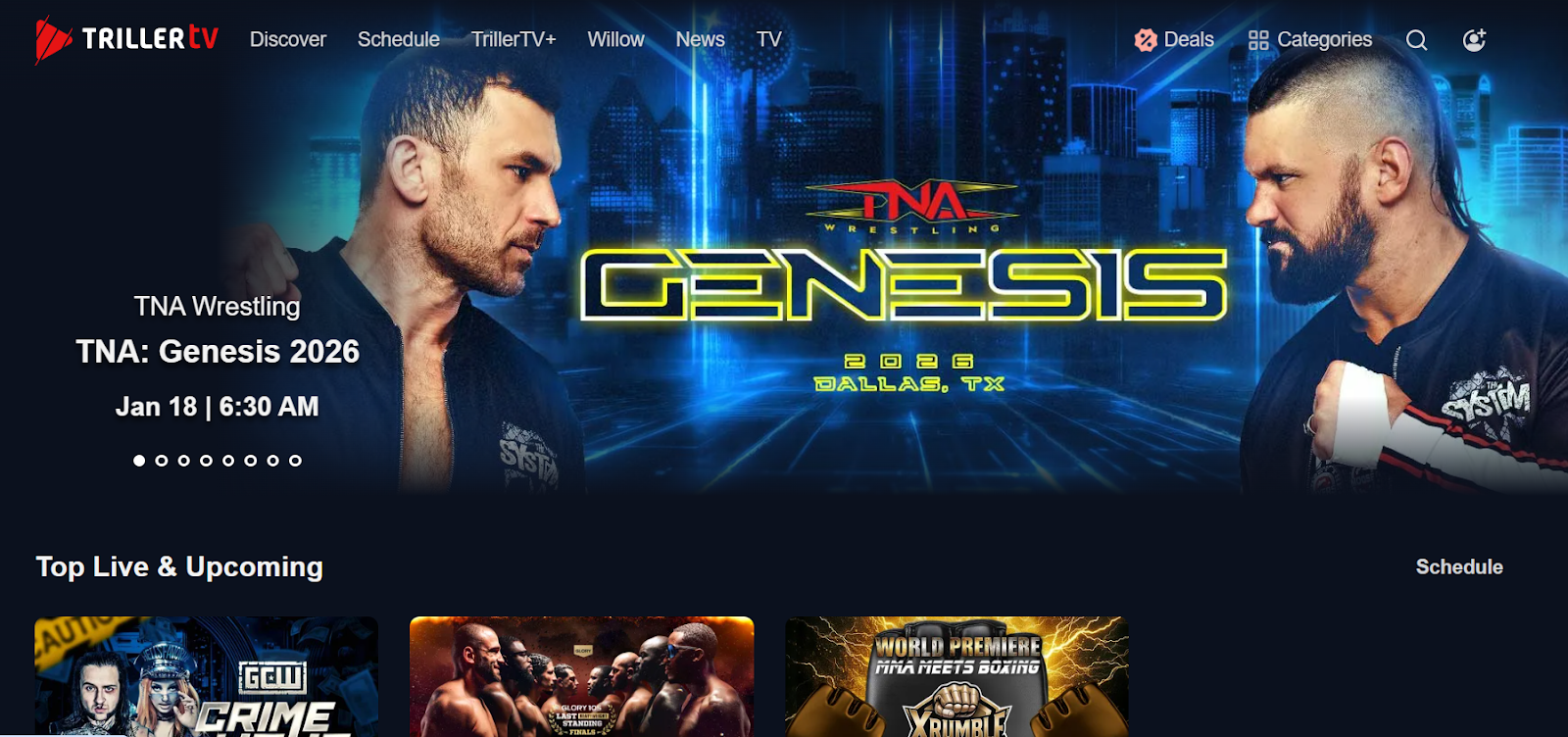
Monetization Streams: Subscriptions, PPV sales, advertising, and sponsorships
Similarly, Whop.com, Fanmio, and Moment House are few popular PPV websites.
Final Thoughts
Pay-per-view is a strategic way to monetize from special and premium content. The advantage here is that you can keep earning even after the live performance or event is over. Fans who have missed watching the event live would always go that extra mile to spend more bucks!
The key is to offer amazing content found nowhere else! Choose the right pricing model and robust technology with a glitch-free viewing experience. Fanso.io is built on the best-in-class tech stack, giving you complete control over your PPV website. So, are you ready to deliver a thrilling and power-packed pay-per-view experience?
FAQ-Related to How to Create a Pay-Per-View Website
1. What is a pay-per-view website?
A pay-per-view website is an online platform where users can access premium content by paying a one-time fee. Exclusive videos, livestreams, posts, events and concerts are popular content types on PPV websites.
2. Is pay-per-view content better than subscriptions?
Both PPVs and subscriptions are great content types for creators to monetize from. If your end goal is to sell exclusive and high-value content, PPVs are ideal. On the other hand, subscriptions are perfect for recurring income, high engagement, and reducing churn.
3. How to monetize on PPV websites?
PPV content sales, commissions, platform fees, merch, upsells, event tickets, tips and donations are different ways to monetize from PPV websites.
4. What is the easiest way to create PPV websites?
Ready-made clone scripts like Fanso.io offer all the essential features, including livestreams, payment gateways, PPV support, security, and analytics to build your PPV websites within a few days.